
Who has elevated access and should they still have it? Reviewing privileged access in ServiceNow
The second question in almost every ServiceNow audit is simple to ask and hard to answer: who holds elevated access to production, how did they get it, and should they still have it?
Part one of this series looked at segregation of duties in change management - whether the person who built a change also promoted it. Part two follows the access behind that change. The same account can acquire privilege through several paths, and a direct-role report shows only one of them.
01 · WHAT EFFECTIVE ACCESS MEANS
Direct assignments are only one path to privilege
Someone can hold an elevated role because it was granted directly. They can also receive it through a group that carries the role, or through another role that contains it two or three levels down.
A report that reads only direct assignments is not slightly incomplete. It is structurally blind to one of the most common ways people end up with more access than anyone intended.Why effective access matters
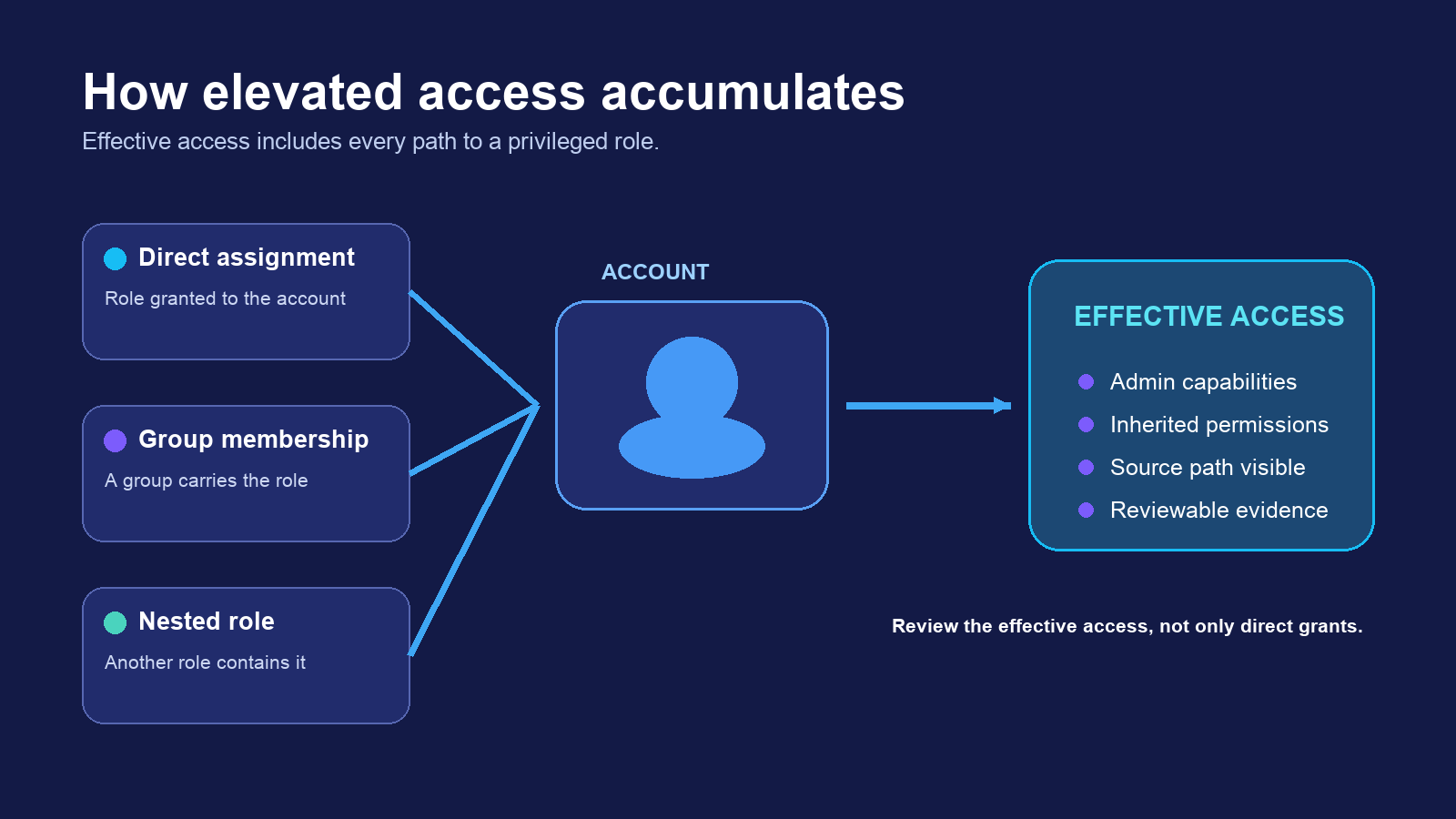
That is why elevated-access evidence takes time to assemble. The reviewer has to resolve the account's effective roles, not simply export a direct-assignment table. The work usually becomes a ticket to the platform team, followed by a CSV, manual reconciliation, and another ticket when the auditor asks a follow-up question.
02 · THE DASHBOARD
Who could go around you entirely
The Elevated Access dashboard uses the same shape as Segregation of Duties: donut charts across the top, a list below, similar filters, and the same export. What changes is the subject. This view shows elevated roles, who holds them, and whether those accounts are set up the way they should be.
When an account needs a second look, you can see what it worked on - which systems and applications - and follow the finding to the underlying record.
Effective access includes direct group and inherited roles
A direct-assignment report misses the way many people acquire privilege. xtype Compliance resolves each path so the review shows the access an account can actually use.
03 · THE FINDINGS TO CHECK FIRST
Start with dormant privilege and self-elevation
Two findings deserve immediate attention. The first is elevated access on an account that never logs in. The second is an account that granted elevated access to itself. Use the two lower column cards for these findings so a reader can compare them before continuing to the combined change-and-access scenario.
Elevated accounts that never log in
Admin rights can remain on a leaver, migration artifact, or integration account that outlived its purpose. Dormant elevated access deserves review even when nobody intended harm.
Accounts that elevated themselves
The person granting access and the person receiving it should not be the same. A self-elevation finding shows the identity, the access path, and the source record behind it.
04 · WHERE THE TWO DASHBOARDS MEET
Change evidence and access evidence show the full sequence
Picture a user who elevated their own access and then used it to promote their own update set. On the Segregation of Duties dashboard, that promotion appears as a possible violation. On the Elevated Access dashboard, the same name appears again with the self-elevation that made it possible.
A change report by itself shows an exception without a cause. An access report by itself shows a risky account with nothing attached to it. Together, the two dashboards show the sequence a reviewer needs in order to decide whether the activity matters.
The same two screens work for an incident
This is useful outside audit season. Suppose something changed in production that should not have: a configuration broke a downstream process, or an activity looked wrong during a review. The opening questions are familiar. What changed? Who promoted it? Were they supposed to be able to?
Reconstructing that by hand takes four investigations: find the update set, find the promotion, pull the account's roles, and work out how the account acquired them. Here, the same two screens used for the audit reconstruct the sequence. Find the change, see who promoted it, then look up that person on the other dashboard to see what access they held, whether they granted it to themselves, and what else they touched.
These are compliance dashboards, not detection tooling. They do not tell you an incident is underway. They compress the reconstruction afterward from days of cross-referencing into a couple of screens, which matters when someone senior is waiting for an answer.
05 · EVIDENCE YOU CAN HAND OVER
A filter and an export replace the ticket loop
Both dashboards export to a spreadsheet, and that detail matters more than it sounds.
The export is sortable, so a reviewer can work it instead of only reading it. It can attach directly to an incident record or compliance request, so it stays with the rest of the audit trail instead of sitting in someone's downloads folder. Every row traces back to a source record, so “show me where this came from” becomes a click instead of another ticket.
That is the difference between a screenshot and evidence that stands up in a walkthrough.
06 · WHAT THE DASHBOARDS DO
They support a control review without claiming to make you compliant
Compliance is a judgment reached about an organization based on whether its controls were designed appropriately and operated as described. No product delivers that verdict.
xtype Compliance does something narrower:
- It answers two specific control questions directly from the records ServiceNow already keeps.
- It covers every promotion and elevated account in the selected period rather than a sample assembled by hand.
- It flags possible violations against a defined rule instead of leaving the reviewer to spot them by eye.
- It keeps every row traceable to its source record, so the export does not contain assertions the reviewer cannot substantiate.
The practical effect is that evidence collection stops consuming a week and becomes a filter and an export. The analyst can spend that time on the work that requires judgment: deciding which exceptions matter and what to do about them.
.svg)

